How to Manage Your Packaging and Brands in eyeView Using Brands & SKUs
How to Manage Your Packaging and Brands in eyeView Using Brands & SKUs
Managing packaging for a brand may seem simple when there are only a few products. However, as new flavors, sizes, languages, markets, suppliers, and artwork versions emerge, keeping track of everything quickly becomes complex.
A single brand may have dozens or even hundreds of SKUs, each with its own packaging, change history, files, approvals, and assigned personnel.
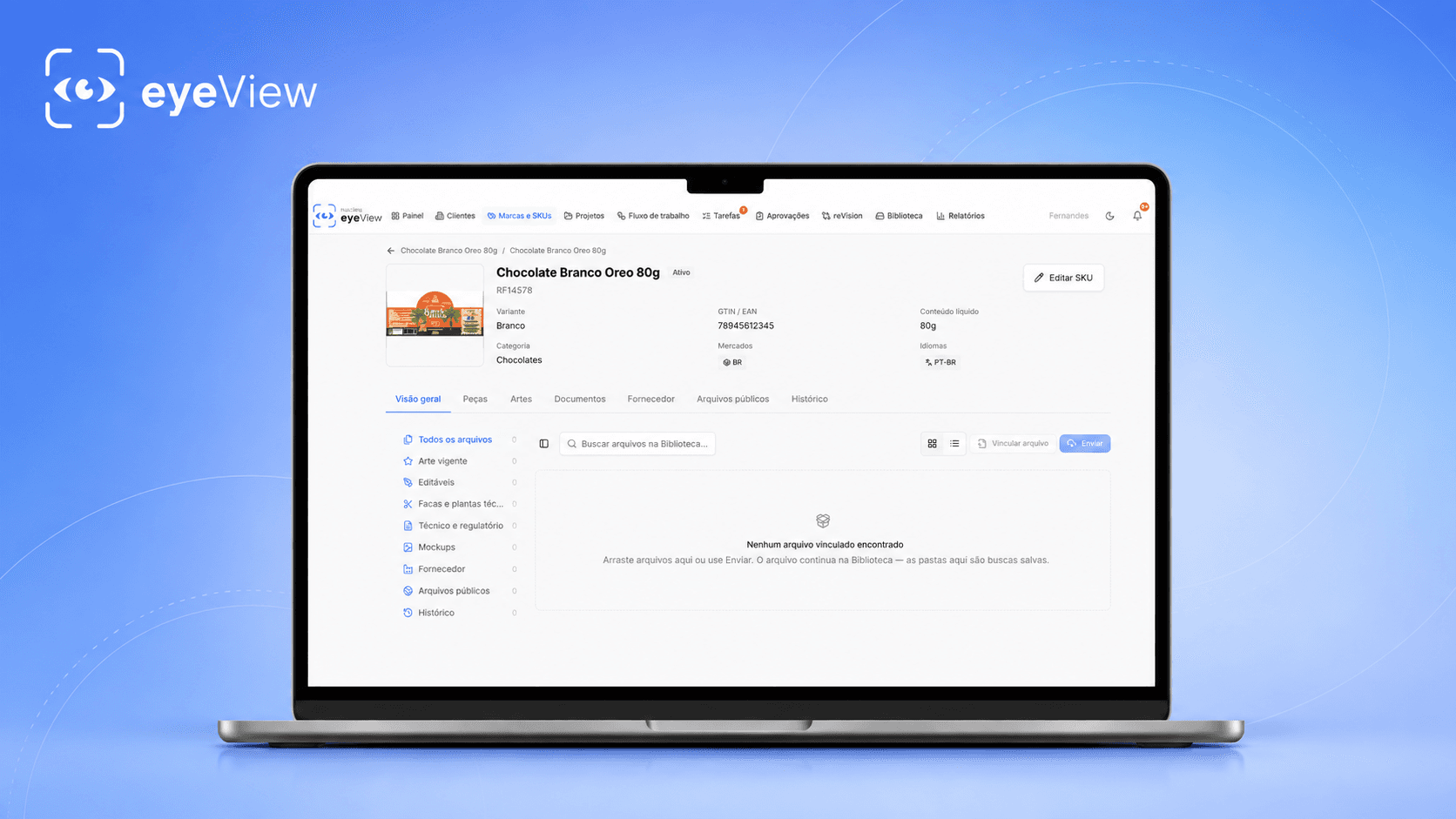
It is precisely to organize this scenario that the eyeView includes the module Brands & SKUs, allowing for centralized management of brands and packaging on a single platform.
What is packaging management?
Packaging management, also known as Packaging Management, is the process of managing all information related to a company's packaging artwork.
This includes everything from the creation of a new product to the final approval of the file that will be sent to production.
Various teams and suppliers typically participate in this process, such as:
- Marketing;
- Brand managers;
- Agencies;
- Designers;
- Prepress;
- Printing companies;
- Converters;
- Clichés;
- Quality departments.
When this workflow takes place via email, WhatsApp, network folders, and scattered files, the risk of using the wrong version or losing important information during the process increases significantly.
O eyeView Brands & SKUs It was developed specifically to centralize this information.
Manage all your brands in one place
With eyeView, companies can organize their various brands within a centralized structure.
Each brand can have its own products and SKUs, allowing you to create a well-organized overview of the entire packaging portfolio.
For example, imagine a food company that has different brands and product lines.
The structure can be organized as follows:
Brand
→ Product Line
→ Product
→ SKU
→ Packaging
→ Artwork Versions
This way, finding the right package no longer depends on file names or manually created folders.
All information is linked to the correct product within eyeView.
What is an SKU?
SKU stands for Stock Keeping Unit.
In practice, each product variant may have its own SKU.
A single product may have different SKUs depending on factors such as:
- Weight;
- Size;
- Flavor;
- Fragrance;
- Language;
- Country;
- Material;
- Packaging format;
- Promotional version.
A line of cookies, for example, may come in 100-gram, 200-gram, and 500-gram packages, as well as in different flavors.
Each of these combinations can represent a different SKU.
With the Brands & SKUs, these variations can be entered and organized within eyeView.
Centralize your packaging files
One of the biggest challenges in packaging management is determining which file actually represents the current version of the product.
Files such as:
final_packaging.pdf
final_packaging_v2.pdf
final_approved_packaging.pdf
final_packaging_now_it's_on.pdf
They are much more common than they should be.
With eyeView, files are directly linked to the corresponding SKU.
This creates a much more secure framework for storing and retrieving the artwork used throughout the packaging lifecycle.
Instead of searching for files on different servers, in emails, or on different computers, the team can now view the history directly within the platform.
Track all versions of the packaging
Packaging is rarely approved on the first try.
During its development, changes may occur in:
- Texts;
- Ingredients;
- Nutritional information;
- Colors;
- Barcodes;
- Graphic elements;
- Legal Information;
- Logos;
- Stamps;
- Dimensions;
- Technical specifications.
That is why the packaging version control It is a fundamental part of any professional packaging process.
Within eyeView, new versions can be linked to the same project or SKU, creating a clear history of that packaging's evolution.
This makes it easy to see which version is under review, which one was approved, and what changes were made during the process.
Online Packaging Approval
Another important aspect of packaging management is the approval process.
Traditionally, a design is emailed to various people, who respond with comments, images, annotated PDFs, or simply messages describing changes.
With eyeView, this process can take place directly on the packaging itself.
Participants can view the packaging PDF, review the content, add comments and annotations, and track the approval process all within the same environment.
This facilitates communication among everyone involved in the project.
A marketing team, for example, can review the communication while the technical team checks the production elements.
All within the same project.
Technical View of Packaging Files
eyeView was developed specifically to work with PDF files of packaging designs.
In addition to traditional viewing, the platform offers important tools for graphical and technical analysis of the files.
Depending on the workflow used, it is possible to analyze elements such as color separations, file information, and artwork details at a high level of zoom.
This makes eyeView more than just a storage system.
It becomes part of the packaging review process itself.
Comments directly on the artwork
When a change is requested in text form only, questions may arise.
For example:
“Reduce the text in the left corner.”
But which text?
By how much should it decrease?
In which area, exactly?
In eyeView, comments can be linked directly to the corresponding area of the packaging.
This reduces misinterpretations and improves communication among brands, agencies, designers, and suppliers.
History and Traceability
When a design goes into production, it's important to know exactly how that file reached its final version.
The history allows you to track information related to the different stages of that SKU and the versions analyzed throughout the project.
This traceability is especially important for companies with large product portfolios.
Instead of relying on someone's memory or searching through old email conversations, the information remains linked to the project itself.
Brands, agencies, and suppliers working together
The development of packaging typically involves several companies.
The brand may work with a design agency, which sends files to a print shop, converter, or prepress company.
Each participant has different responsibilities.
With eyeView, everyone can work on the same project and view the same packaging file.
This creates a collaborative workflow between:
Brand → Agency → Prepress → Printing/Conversion → Approval
Instead of creating different copies of the file at each stage, everyone begins working from a centralized source of information.
Manage hundreds of SKUs more efficiently
When a company has only a few products, a folder structure might actually work.
The problem arises when there are hundreds or thousands of packages.
Imagine a brand with:
200 products;
4 languages;
3 sizes;
2 packaging options.
Before you know it, there could be hundreds of SKUs and related files.
In this scenario, manually searching for information becomes time-consuming and increases the risk of errors.
A platform for SKU and packaging management It allows you to organize this portfolio in a much more structured way.
With Brands & SKUs, eyeView now serves as a central hub for viewing and tracking the company's packaging.
Fewer scattered files. More control over your brand.
A package file isn't just a PDF.
It contains information that directly represents a brand to consumers.
A small error can lead to reprints, wasted materials, production delays, and significant costs.
Therefore, having control over versions, SKUs, comments, and approvals is essential for companies that handle large volumes of packaging.
With the eyeView Brands & SKUs, brands can organize their products and packaging within a centralized structure, keeping records, files, and approval processes linked to the correct SKU.
Make eyeView the hub of your packaging management
eyeView integrates brand and SKU management with the packaging review and approval process.
In a single environment, your team can organize products, access artwork, track versions, review files, and collaborate with agencies and suppliers.
The result is a more organized, traceable, and secure packaging process.
Manage your brands. Organize your SKUs. Centralize your packaging.
Learn about the eyeView Brands & SKUs and gain a comprehensive view of your company's packaging lifecycle.